How Payment Receipt OCR API Simplifies Automated Payment Data Processing
Payment receipts are an important part of many financial and business workflows. They may be received as screenshots, scanned images, or PDF documents after a payment has been completed. While the information is usually easy for a person to read, transferring that information into software can require additional manual work.A business that handles only a few receipts may not notice this effort. However, when payment records increase, manually reading documents and entering their information can become repetitive and difficult to manage efficiently. This is where a Payment Receipt OCR API can provide a practical approach to document processing.
Turning Payment Receipts Into Structured Information
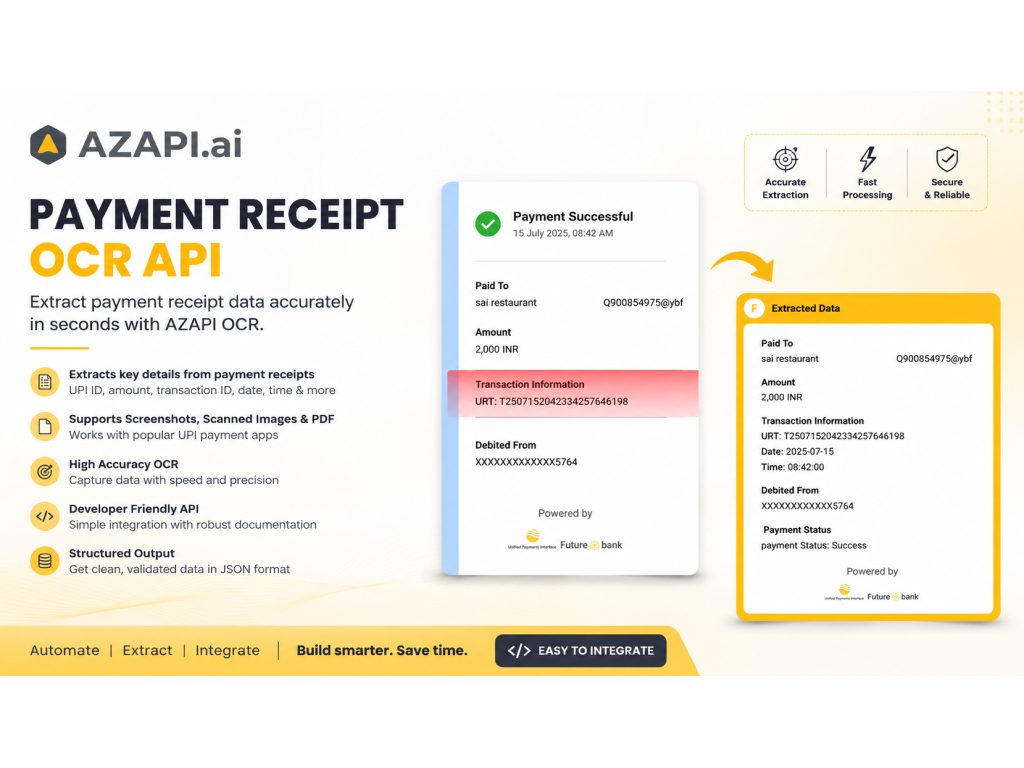
Optical Character Recognition (OCR) enables software to read text from images and documents. When this capability is provided through an API, developers can connect document recognition with applications and existing business workflows.The AZAPI Payment Receipt OCR API is designed to extract useful information from supported payment receipts and make that information available in a structured format.
Depending on the receipt, the extracted information can include:
- Recipient or payee name
- UPI ID
- Payment amount
- Currency
- Transaction ID
- UTR number
- Payment status
- Date and time
- Source payment application, where available
- Masked account or card information, where available
The resulting information can then be passed to another system for validation, storage, reporting, or additional processing.
Why Manual Receipt Processing Becomes Difficult
Reading a single payment receipt is generally a straightforward task. The challenge comes from repetition.Consider a business that receives payment confirmations from customers throughout the day. Each receipt may need to be opened individually so that an employee can check the amount, reference information, date, and other relevant details before entering them into another application. As the number of receipts increases, this creates a workflow that depends heavily on manual data entry.
Automating the extraction stage can reduce the amount of repetitive work involved. Instead of treating every receipt as a document that needs to be manually read, an application can send the supported receipt for processing and work with the extracted information.
Different Receipt Formats
Payment information does not always arrive in a single format. Customers and businesses may exchange screenshots from payment applications, scanned receipt images, or PDF payment confirmations. A document-processing solution therefore needs to work with different types of input rather than assuming that every receipt will have the same layout.The AZAPI Payment Receipt OCR API supports digital screenshots, scanned images, and PDF receipts from supported UPI-based payment applications. This provides developers with an API layer that can be connected to applications already handling payment or financial information. The exact information available for extraction depends on the content and quality of the submitted receipt.
Practical Applications
Structured payment receipt information can be useful in several business and software workflows.- Payment reconciliation can use extracted amounts and reference information when matching receipts with payment records.
- Accounting applications can use receipt information as an input for maintaining financial records.
- Expense management systems can process receipts submitted by employees or customers without requiring every field to be entered manually.
- Financial applications can incorporate receipt extraction into broader document-processing workflows.
- Payment tracking systems can use identifiers, amounts, dates, and status information for record management.
- Internal dashboards can use structured receipt information for reporting and monitoring.
Integrating OCR With Existing Applications
Building document recognition functionality internally can require several components. A development team may need to handle uploaded files, image processing, OCR, field recognition, validation, and changes in document formats. For applications where document processing is only one part of a larger system, an API can provide a more direct integration point.Developers can connect receipt processing to their existing backend, database, accounting software, dashboard, or other business application. The application can then decide how the extracted information should be validated and used.
This can be particularly useful for fintech platforms, accounting software, SaaS applications, payment-related tools, and internal business systems that regularly work with payment documents.
The Role of Automation in Financial Workflows
Automation does not always mean replacing an entire business process. In many cases, improving one repetitive stage can make an existing workflow easier to manage.Payment receipt extraction is one example. The receipt already contains information that a business needs, but that information may be locked inside an image or document. OCR provides a way to make the information available to software.
Once the data is structured, it can become part of a larger workflow involving reconciliation, accounting, reporting, record management, or other financial processes.
The AZAPI Payment Receipt OCR API provides developers with an API-based way to add payment receipt data extraction to their applications without making OCR the central component of their own software.
For more information about the service and its integration options, visit the AZAPI Payment Receipt OCR API page.